AI vendor lock-in or AI autonomy?
What is AI autonomy and how do you achieve it? We explain what the architecture of AI looks like and what that means for you.
Rien Heuver
What is AI autonomy and how do you achieve it? We explain what the architecture of AI looks like and what that means for you.
Rien Heuver
Your organisation is almost certainly already using AI, and chances are it’s Copilot. But why, really? And is that a wise choice, or does it worry you? In this blog post, I’ll explain how the architecture of AI is put together and how that can help you become less dependent on the big AI companies. Less AI vendor lock-in, more AI autonomy.
When organisations want to use AI, the choice sometimes seems very limited. My impression, based on conversations with clients, interactions with the public at lectures, and what I read on LinkedIn, is that at least 80% of Dutch organisations use Copilot. Besides that, there are a few that use ChatGPT or Claude. But is that actually a good choice?
Setting aside the potential dangers of AI for the economy and society, which I’d nonetheless be happy to discuss, for most knowledge workers it’s beyond dispute that AI is going to become a huge part of their work processes. Virtually everyone recognises that AI will, one way or another, have an enormous impact on their work sooner or later. So the question “which AI vendor should I choose?” is a very fair one!
But if you ask an organisation that uses Copilot: “Why did you choose Copilot?”, I already know the most probable answer. What do you think? Is it:
Isn’t that absurd? How can it be that we all realise AI is going to become enormously important for our work, that many will perhaps become dependent on it (or already are!), and yet nobody made the choice of which vendor to use?! This kind of creeping behaviour is exactly what Microsoft wants to happen with Copilot: bit by bit, the ‘vendor lock-in’ only grows, and your autonomy shrinks.
What’s wrong with vendor lock-in?
Vendor lock-in means you’re trapped in a vendor’s services; switching takes so much effort, time, and money that the barrier has become so high you stay with that vendor. But what if that vendor turns off features? Or closes your account? Or doubles the prices? If your organisation is digitally autonomous (and AI-autonomous), you won’t suffer from any of that.
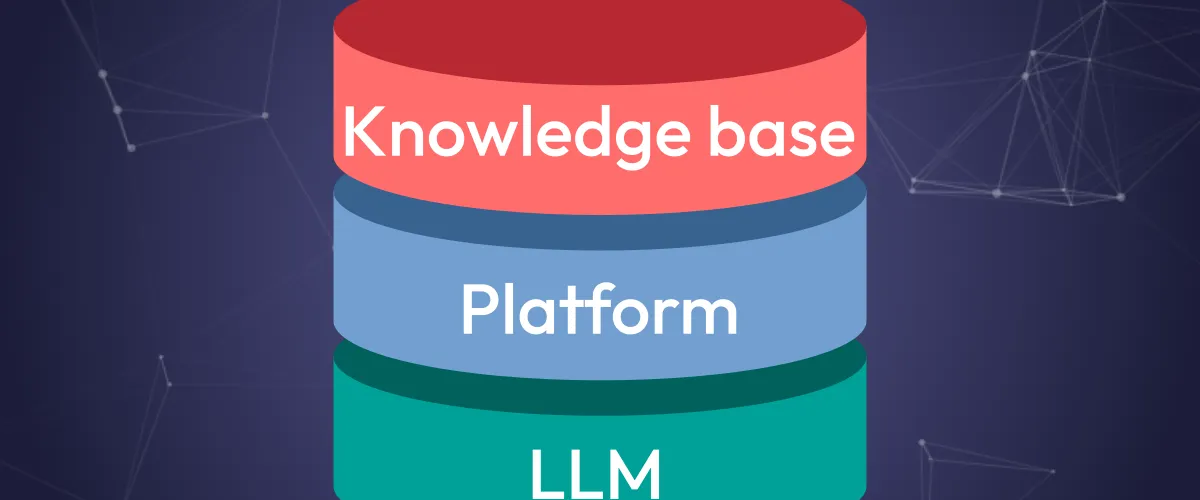
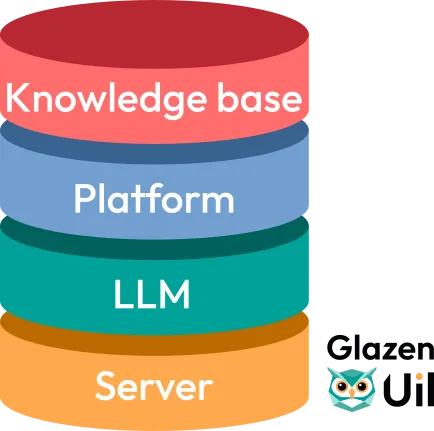
So it’s time for AI autonomy! How do we achieve that? I’m going to tell you. First, it’s important to better understand how AI systems are put together: the AI architecture. Broadly speaking, it consists of 4 layers, in order: the server, the LLM, the platform, and your knowledge base.
This is simply a computer running software. Similar to your laptop, except it looks a bit different and sits in a large data centre. To run language models (layer #2), you need servers with a lot of specialised computing power (called GPUs). Companies that deliver computing power for language models as a service are called ‘inference providers’. For this layer, you can opt for your own hardware: then you set up a hefty server in your office building (or in the hallway at home). Or you outsource it to an inference provider.
If you use Copilot, you’re using Microsoft’s servers, perhaps even the ones in Middenmeer, at the very top of North Holland. In Copilot’s architecture, Microsoft is therefore the inference provider itself. But you can perfectly well choose a different vendor, for example European providers that only have to comply with EU law, so you can be more confident that your data won’t fall into the wrong hands. Such as the French Scaleway, with data centres in Paris; greener electricity than in the Netherlands. Or the German Melious, also very green, and they’re very quick to add the latest models to their portfolio.

AI model, language model, large language model (LLM): the beast goes by several names these days. How should you picture a language model in the bigger scheme of things? Without explaining exactly how such a language model works on the inside: think of a language model a bit like one of those CDs from back in the day with, say, Word 2007 on it. With just the CD you can’t do anything; you need a computer to put the CD into so the software becomes active. The same goes for a language model: it also needs a computer, or server, to be able to give an answer.
The good news is that there are an enormous number of language models to choose from! If you use Copilot, in the settings you can choose from models from OpenAI or Anthropic, two big American AI companies. But fortunately there’s much more to choose from! Some models are made available to run on a server (layer #1) of your own choosing. We call these ‘open-weight’ models. There are dozens of open-weight models available to choose from, and these models hardly fall short of the best closed models. At Glazen Uil, for example, at the time of writing (October 2026) we’re using GLM 5.3 Flash.

To be able to use AI, you need an AI platform. Examples include ChatGPT, Copilot Cowork, Claude Code, but also, for instance, the integration in programs like Excel. The platform is the place where you address the AI and where it gives you its answer. With some platforms you can only chat (like when ChatGPT started), and with others you can edit documents, send emails, or even develop software. If you can give a platform a task and it gets to work on it by itself (coming up with a plan of action, carrying out tasks, using other systems, etc.), then we’re talking about an ‘agent’. Platforms specifically for AI agents are often not called an AI platform, but an AI harness.
So an AI platform (or harness) can take many different forms, and choosing which platform you use is quite important! The platform determines which ‘skills’ the AI gets: such as reading and editing documents on your computer, searching the internet, sending emails, and so on. A platform also contains instructions for the language model so it can handle those skills better. So a lot is already happening under the hood of such a platform before you’ve typed your first letter. Many of the recent improvements in AI capabilities (creating presentations, writing software, autonomously carrying out all kinds of tasks) are largely thanks to better AI platforms.
But did you know you can also choose from all kinds of options here? At Glazen Uil, for example, we currently use OpenWebUI for AI questions and simple documents, OpenCode for software development and data analysis, and Dify for bespoke AI workflows. But we regularly look at new platforms, because developments move fast and we can switch to our heart’s content. What matters here is that the platform can work with different inference providers (layer #1) so that we maintain our AI autonomy. Fortunately, this is standard with all open-source platforms — and as it happens, those are exactly our preference.

We actually all already know this layer. Your knowledge base contains all your information: documents, images, spreadsheets, links, and so on. An AI only becomes truly valuable once you give it access to your knowledge base, so it better understands what you want. For example, if you ask “what is our policy in the event of a data breach?”, it’s rather handy if the AI platform (layer #3) has access to the policy documents. Ideally, the platform has access to as much (structured) data as possible, so it can always help you as well as possible. That said, it’s then important that you also trust that platform with all that data!
For organisations that use Microsoft, this knowledge base is often in SharePoint. Some perhaps use Google Drive, or maybe Dropbox. Organisations with a European IT setup probably use Nextcloud, Mailbox, Proton Drive, or one of the many other options. So once again, there’s plenty to choose from for layer #4 as well. At Glazen Uil we currently use Mailbox, and privately I use Nextcloud.

These four layers stack on top of each other and communicate with each other. You can only connect two layers to each other if they use the same connection. Think of it a bit like a plug and a socket: your laptop’s plug doesn’t just fit into an Italian socket! Fortunately, there are open standards for all layers: so make choices for layers that support these standards, so you can connect them to each other. Because in principle every layer is interchangeable, provided your entire AI architecture uses open standards.
But that principle only holds if you select your vendors with this in mind. A vendor like Microsoft (Copilot) gives you little choice in this; after all, they want you to get caught in the Microsoft ecosystem as much as possible: vendor lock-in, in other words. Many of the examples I’ve mentioned for the different layers are built on open standards, and for those the principle does apply. At Glazen Uil, we only use software (for AI and beyond) that works with open standards, so you can always ask us for advice.
In my next blog post, I’ll make an extensive comparison between the different options for each layer: how good are they, and how expensive? What makes one choice different from another, and when is it worth switching?

Want to talk further based on this blog? Contact us:
rien@glazenuil.nlLinkedInView this blog on LinkedIn:
https://www.linkedin.com/posts/rienheuver_wat-voor-ai-systemen-gebruikt-jouw-organisatie-share-7518968062138814464-TFt9