Blog7 to 9 min.5/27/2026
How can your organization become less dependent on Microsoft and other American Big Tech? In this blog post, I will tell you about good alternatives for email, calendars, documents, and video meetings. In short: how do you achieve digital autonomy in your organization’s core software? At Glazen Uil, we only use European and/or open-source software. To cover our core functionality, we chose the German Mailbox, so I will also explain directly why we made that choice.
The core software for every organization
In this second part of our blog series on digital autonomy, we are discussing the software that every organization needs:
- Sending and receiving email
- Calendar management
- Editing documents (text files, spreadsheets, and presentations)
- Sharing documents with colleagues
- Online video meetings
Glazen Uil cannot function without these either, so when we had to make a choice for this software, we naturally took into account the selection criteria from the first part of our blog series on digital autonomy.
“And what about an AI environment? As AI experts, you must have an independent solution for that, right?” We certainly do! But that is a blog post in itself, so that will come in part three 😉 Follow our LinkedIn page to stay updated!
70% are stuck in vendor lock-in
Yes, really, 70% of Dutch organizations depend on Microsoft. That is a massive risk! Modern organizations are becoming increasingly dependent on large (American) software providers: vendor lock-in. Where we used to have an IT department that knew exactly how everything worked, today we outsource the lion’s share to SaaS: Software-as-a-Service. It is incredibly convenient, but also incredibly making us dependent.
Imagine that you can no longer access Microsoft (or Google, Atlassian, or any other service provider you are heavily dependent on) due to an outage, international sanctions (see below), changes in terms of use, etc.—you are in a real bind. The dependence on Microsoft for daily operations has become so great through Windows, Outlook, Teams, Copilot, and PowerPoint that you might as well take a day off if it goes down. By reducing dependence on other companies, an organization naturally becomes much more resilient. At Glazen Uil, we do not want to take those risks; we want autonomy in our digital operations. That is why we only use services that we either:
- Manage ourselves on our own infrastructure, or
- Can easily replace with another provider, thanks to open standards.
European options for core business software
There are many different options, of course, but we have investigated the following in more detail to provide a good comparison. These options differ in several important aspects, but they are all European, of course!
- Proton
- Nextcloud
- Soverin
- Mailbox
In addition, we include Microsoft in our comparison to provide a complete picture of the trade-offs. Researching all these options can take a lot of time, so if you want to switch yourself, hopefully our considerations will be helpful (and if not, you can always contact us, of course—we are happy to help!)
For those who haven’t read the first part of this blog series, here are the most important criteria we looked at:
- Price
- Open-source or European
- Open standards
- Integration between different functions and systems (see next chapter)
Integration of systems
We don’t mind using different services from different providers, as long as they are well-integrated.
For example: if we schedule a meeting in our calendar, we want to be able to create a video link immediately and want to invite people from our contacts so they receive an email right away with the date, time, and video link.
And when others invite us to a meeting, we want to be able to accept that invitation from our email and have the meeting automatically appear in our work calendar. This requires good integration between email, video meetings, and calendars.
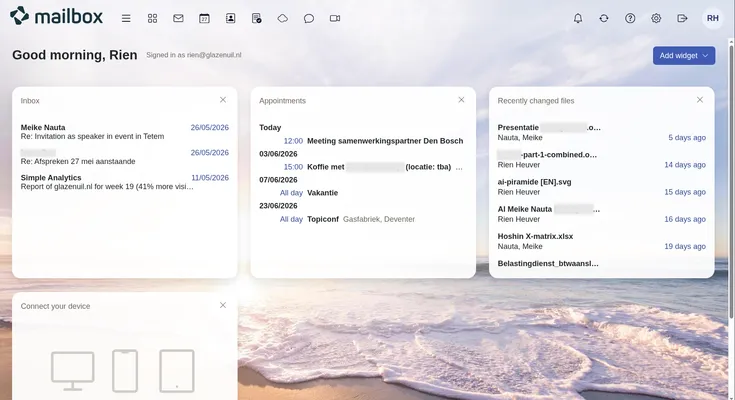
Dashboard from https://app.mailbox.org
The comparison: EU vs Microsoft
Time to weigh the options against each other based on the aforementioned criteria.
European alternatives for business software
Price per month €13/employee Own server (from €20) €2.42 + €0.83/employee €25 + €3/employee €6.24/employee
EU-based Swiss German Dutch German American
Open standards Limited
Privacy-first
Mail
Calendar
Collaborative online working
Document sharing
Video meetings
Advantages Excellent security, lots of functionality Open source, full control Datacenter in the Netherlands Meets criteria, scalable pricing, 100% green energy Widely used, good integration between systems
Disadvantages Limited interoperability due to heavy security, non-EU No native email. Technical knowledge required for management No documents and video meetings No native mobile apps Vendor lock-in, non-EU, poor interoperability
Proton
Perhaps the most well-known European alternative to Microsoft and Google. Proton is Swiss, which unfortunately means it falls outside the European Union. This also means different legislation, and unfortunately, Switzerland is currently working on weakening its privacy laws. However, privacy is Proton’s highest priority, which is why they use a lot of end-to-end encryption. It is very secure, but unfortunately, that heavy encryption also means it does not integrate well with other applications. In turn, this means switching from Proton to another provider later on is complicated; in short, the vendor lock-in with Proton is actually quite large!
Nextcloud
Nextcloud is a comprehensive ecosystem made in Germany. It has many users, is currently being rolled out in large organizations in Europe, and has thus proven itself as a scalable platform. For example, there is currently a pilot at SURF to deploy Nextcloud in Dutch educational institutions. To use it, you will need to go to a third party for hosting (such as the Dutch thegood.cloud) or you will have to install and manage it yourself on a server. Advantage: you have full control over the system. Disadvantage: a lot of technical knowledge is required to set it up correctly. This makes it a very suitable candidate for larger organizations that have their own IT department. The biggest disadvantage of Nextcloud for us: it does not offer an email service.
Soverin
An email service from the Netherlands! You might think this is a perfect solution in combination with Nextcloud mentioned above, and for many organizations, it might be. We considered this seriously, but we do not need the scale of Nextcloud, so Mailbox was a better solution for us: an integrated whole without us having to tinker with it ourselves much.
Mailbox
Also made in Germany, this provider offers the complete package we are looking for: email, calendar, documents, storage, and video meetings. Mailbox even offers more functionality than we need; for example, they also have chat and task management. The price is also excellent! For us, Mailbox is the perfect match. It does not have its own mobile apps, which isn’t necessary anyway, because thanks to the use of open standards, it works in all other mobile apps such as Outlook or Google Calendar. And there are plenty of apps that support open standards, including European and open-source apps for email and calendar. And most importantly: if we are no longer satisfied later on, we can easily switch, because thanks to the use of open standards, we have no vendor lock-in with Mailbox.
Microsoft
The biggest player for decades, king of vendor lock-in, and 100% American. Despite having an enormous amount to offer (Word, Outlook, SharePoint, Copilot, even Windows is theirs), Microsoft was, of course, never an option for us, but it is included in the comparison for completeness. Their ecosystem is so tightly integrated that everything works very well together, but that also makes it very difficult to leave: vendor lock-in. Did you know Microsoft is losing money on Copilot? This means prices will likely go up significantly at some point; how much are you willing to pay? How easy will it be to switch to something else? And thanks to the US CLOUD Act, the US government can always request your data, even if your data is on European servers—not exactly a pleasant thought. Because in Microsoft’s systems, you likely have a lot of data: personal data, customer data, trade secrets, and much more. The US government does not always handle this data responsibly. The vendor lock-in is strong, and the certainty that Microsoft will always continue to serve you is questionable, making it a major risk. For instance, the prosecutor of the International Criminal Court discovered last year that his Microsoft account was suddenly blocked due to sanctions from President Trump; suddenly, he could no longer access his email, calendar, etc.
And you?
There is a high chance that your organization is also heavily dependent on Microsoft or Google. This brings risks, but it is also easier said than done to switch to alternatives. You don’t just overhaul an IT landscape that has been built up over many years. Fortunately, you don’t have to switch all at once. Our advice: start small within the organization and build up slowly; additionally, when choosing new applications, make the critical assessment of whether there are other options. Research the possibilities of your own AI environment or replace Miro, Microsoft Forms, or DocuSign first, for example; this might sound very daunting, but in practice, it will surprise you positively. Of course, we are happy to support your organization with this. So, contact us for an introduction; we are happy to provide lectures, strategic analyses, and migration processes!
In addition, at Glazen Uil, we use much more than just this basic software: accounting, AI, bank accounts, chat, document signing, git, CRM, etc. Everything is 100% European and/or self-managed! In the rest of this blog series, we will take you through the choices we have made for other European alternatives. Next time: a private AI environment where you can have conversations without worry and upload sensitive data. Follow us on LinkedIn to see when a new blog post goes online!
Bonus: my favorite apps
Because Mailbox uses open standards, I can choose which apps I want to use with Mailbox on my computer and phone. Additionally, for private use, I use other systems based on open standards, so I find it useful to be able to view and edit my work and private email and calendar in a single overview. These are the apps I use for that with satisfaction—all highly recommended:
- FairEmail: an open-source email app for Android from the Netherlands with a focus on privacy. For a one-time fee of €7, you also get all pro features and support the developer, which is more than worth it. Very satisfied with it!
- ACalendar+: a German Android app for calendar and tasks; the pro version costs a one-time fee of €10, but that was certainly worth it too. Very handy to have work and private in one overview, which greatly improves my productivity.
- BetterBird: Open-source software on your computer for calendar, tasks, and email all at once. BetterBird is an improved derivative of the well-known Thunderbird from Mozilla (also known from Firefox); it has been around for a long time and works very well.
Hopefully, after reading this blog post, you also have more confidence in transitioning toward more digital autonomy. Perhaps you’ve already started, or now have the motivation to truly get to work? I’d love to hear about it and would enjoy talking about this. Let me know!